Blender: Creating a minimal Python add-on
This post shows a minimal working example of a Blender Python add-on in Blender 5.0. The full source code is found here.
Create a directory for your add-on and add the following empty files:
__init__.pyoperators.pypanels.py
__init__.py contains the loading and unloading code for your module.
Blender loads it when initialising your module.
This is the only mandatory file.
operators.py will contain your functions and panels.py will hold buttons and other UI elements for calling the functions.
For this example, they are empty.
A minimal __init__.py:
import bpy

bl_info = {
    "name": "ExampleAddOn",
    "blender": (5, 0, 0),
    "category": "Object",
}

from . import operators as ops
from . import panels

def register():
    print("Registering ExampleAddOn!")

def unregister():
    print("Unregistering ExampleAddOn!")

if __name__ == "__main__":
    register()
Blender loads and unloads your add-on by calling register and unregister respectively and bl_info contains add-on metadata.
The __name__ == "__main__" branch lets you run the module directly within Blender using “Run Script”.
Hot reloading
We can enable hot reloading within Blender by adding some extra code to __init__.py.
Insert the following lines before bl_info:
import importlib
from types import ModuleType
The ModuleType is used for type annotations and is optional.
After our module imports, add:
modules: tuple[ModuleType] = (
    ops,
    panels
)

if "bpy" in locals():
    for m in modules:
        importlib.reload(m)
This groups our modules in a tuple and reimports them in a loop.
To reload your add-ons, press F3 and run Reload Scripts.
Loading the add-on
In Windows, Blender add-ons reside in C:\Users\<USER>\AppData\Roaming\Blender Foundation\Blender\<VERSION>\scripts\addons
For ease of development, I recommend creating a symbolic link to your add-on.
By default, your add-on will be in an inactive state.
Navigate to Preferences/Add-ons and tick the checkbox next to your module’s name to load it.
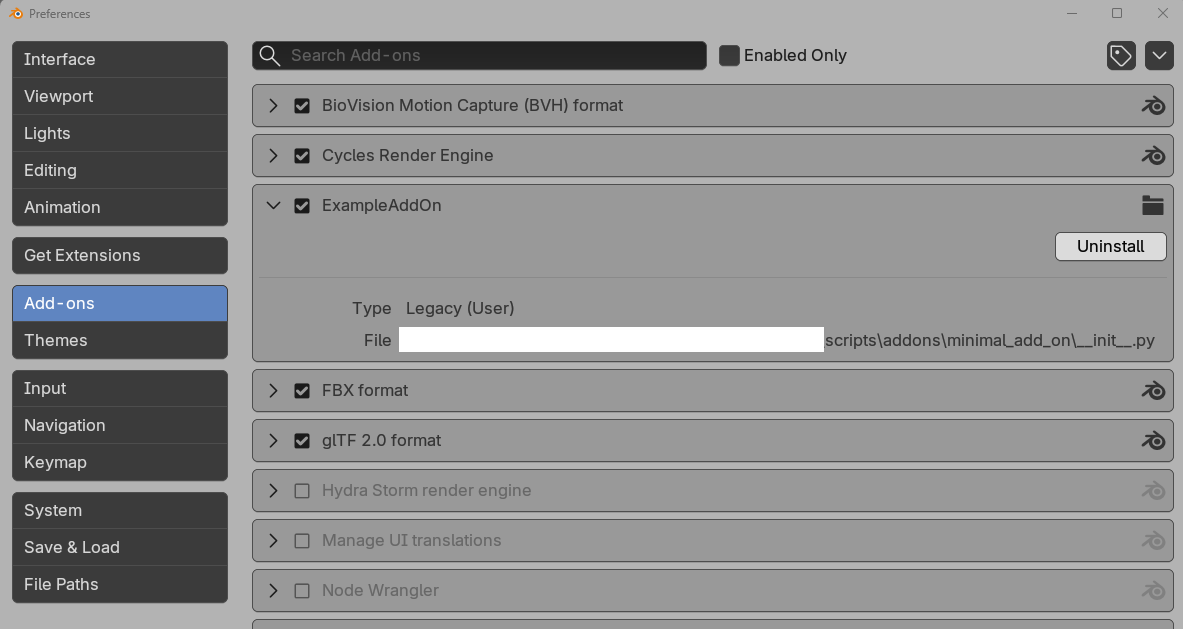
You can verify that it’s working by loading the console with Window/Toggle System Console.
This concludes the creation of a minimal Blender add-on with hot-reloading.