UE5: Creating an editor dropdown menu
This post shows how to customise the Unreal Engine 5 editor with a custom dropdown menu. The full UE 5.7 example project is found here.
We will create an editor module, register it with the editor, and create a class to add our editor menu. References for some of the concepts within are listed at the end.
Initial Setup
We begin by creating a fresh UE5 project called DropdownMenu containing an empty DropdownMenu game module.
Game modules cannot use editor features so we need to create a new editor module to implement our menu (DropdownMenuEditor).
Add a reference to the new DropdownMenuEditor module in the .uproject file.
"Modules": [
		{
			"Name": "DropdownMenu",
			"Type": "Runtime",
			"LoadingPhase": "Default"
		},
		{
			"Name": "DropdownMenuEditor",
			"Type": "Editor",
			"LoadingPhase": "Default"
		}
	]
Within the Source directory, create a DropdownMenuEditor directory alongside DropdownMenu
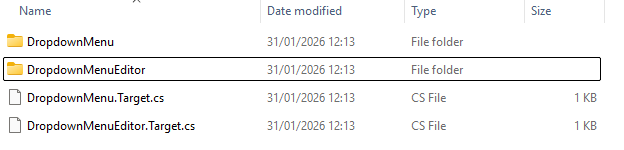
The DropdownMenuEditor.Target.cs file may already exist.
The full file should look like the code below.
Ensure ExtraModuleNames.Add adds "DropdownMenuEditor" and not "DropdownMenu" (the game module).
// Copyright Epic Games, Inc. All Rights Reserved.

using UnrealBuildTool;
using System.Collections.Generic;

public class DropdownMenuEditorTarget : TargetRules
{
	public DropdownMenuEditorTarget( TargetInfo Target) : base(Target)
	{
		Type = TargetType.Editor;
		DefaultBuildSettings = BuildSettingsVersion.V6;
		IncludeOrderVersion = EngineIncludeOrderVersion.Unreal5_7;
		ExtraModuleNames.Add("DropdownMenuEditor");
	}
}
Within the DropdownMenu directory, create these empty files:
DropdownMenuEditor.Build.csDropdownMenuEditor.hDropdownMenuEditor.cpp
DropdownMenuEditor.Build.cs configures how our module is compiled by the UnrealBuildTool.
Add the code below; LevelEditor, Slate and SlateCore are needed for adding our menus.
using UnrealBuildTool;

public class DropdownMenuEditor : ModuleRules
{
    public DropdownMenuEditor(ReadOnlyTargetRules Target) : base(Target)
    {
        PrivateDependencyModuleNames.AddRange(new string[] {
			"Core", "CoreUObject", "Engine", "Slate", "SlateCore", "LevelEditor"
		});
    }
}
C++ Implementation
To begin, we’ll add an empty C++ class for our module.
Header
#pragma once

#include "Modules/ModuleInterface.h"

class FDropdownMenuEditorModule : public IModuleInterface {
  public:
    virtual void StartupModule() override;
    virtual void ShutdownModule() override;
};
Source
#include "DropdownMenuEditor.h"

IMPLEMENT_MODULE(FDropdownMenuEditorModule, DropdownMenuEditor);

void FDropdownMenuEditorModule::StartupModule() {}
void FDropdownMenuEditorModule::ShutdownModule() {}
Adding stub menu building functions
Header
Add the following member functions and forward declarations for building the menu.
class FMenuBarBuilder;
class FMenuBuilder;

class FDropdownMenuEditorModule : public IModuleInterface {
    // previous declarations unchanged
  private:
    void CreateDropdownMenu();
    void CreateDropdownMenuExtension(FMenuBarBuilder& MenuBarBuilder);
    void CreateDropdownMenuExtensionButtons(FMenuBuilder& MenuBuilder);
};
Source
Add two required includes and call CreateDropdownMenu in StartupModule but leave everything else blank for now.
#include "LevelEditor.h"
#include "Modules/ModuleManager.h"

void FDropdownMenuEditorModule::StartupModule() {
    CreateDropdownMenu();
}

void FDropdownMenuEditorModule::CreateDropdownMenu() {}
void FDropdownMenuEditorModule::CreateDropdownMenuExtension(FMenuBarBuilder& MenuBarBuilder) {}
void FDropdownMenuEditorModule::CreateDropdownMenuExtensionButtons(FMenuBuilder& MenuBuilder) {}
Implementing CreateDropdownMenu
Unreal uses the FExtender class to register new menus.
We will add one as a class member so that we can unregister it in ShutdownModule
Header
#include "Templates/SharedPointer.h"

class FExtender;

class FDropdownMenuEditorModule : public IModuleInterface {
    // previous declarations unchanged
private:
    TSharedPtr<FExtender> ToolbarMenuExtender;
};
Within CreateDropdownMenu, initialise our FExtender and add our new menu after Help in the menu bar.
CreateDropdownMenuExtension is the callback that will build the menu.
ToolbarMenuExtender = MakeShared<FExtender>();
ToolbarMenuExtender->AddMenuBarExtension(
    "Help",
    EExtensionHook::After,
    nullptr,
    FMenuBarExtensionDelegate::CreateRaw(
        this, &FDropdownMenuEditorModule::CreateDropdownMenuExtension));
}
Load the level editor module and register our FExtender with its menu extensibility manager.
auto& LevelEditorModule{FModuleManager::LoadModuleChecked<FLevelEditorModule>("LevelEditor")};
auto ExtensibilityManager{LevelEditorModule.GetMenuExtensibilityManager()};
ExtensibilityManager->AddExtender(ToolbarMenuExtender);
The extender calls CreateDropdownMenuExtension which builds the menu and registers CreateDropdownMenuExtensionButtons as the callback to populate the buttons.
The first two arguments are the menu’s name and mouseover tooltip text.
void FDropdownMenuEditorModule::CreateDropdownMenuExtension(FMenuBarBuilder& MenuBarBuilder) {
    MenuBarBuilder.AddPullDownMenu(
        LOCTEXT("ExampleMenu_Label", "Example Menu"),
        LOCTEXT("ExampleMenu_Tooltip", "An example menu"),
        FNewMenuDelegate::CreateRaw(
            this, &FDropdownMenuEditorModule::CreateDropdownMenuExtensionButtons));
}
The LOCTEXT macro above is used to create a localised FText instance.
It requires defining LOCTEXT_NAMESPACE at the start of our file and then removing it at the end.
// Start of file
#define LOCTEXT_NAMESPACE "DropdownMenuEditor"
// End of file
#undef LOCTEXT_NAMESPACE
Implementing CreateDropdownMenuExtensionButtons
To populate our menu, we’ll need some functions to bind to the buttons. In the header, add the following functions.
class FDropdownMenuEditorModule : public IModuleInterface {
    // previous declarations unchanged
  private:
    static void ExampleStaticFn();
    void ExampleMemberFn();
};

void ExampleFreeFn();
In the cpp, we’ll just make them print to the log.
void FDropdownMenuEditorModule::ExampleStaticFn() {
    UE_LOG(LogTemp, Log, TEXT("In a static member function!"));
}
void FDropdownMenuEditorModule::ExampleMemberFn() {
    UE_LOG(LogTemp, Log, TEXT("In a member function!"));
}

void ExampleFreeFn() {
    UE_LOG(LogTemp, Log, TEXT("In a free function!"));
}
Now let’s implement CreateDropdownMenuExtensionButtons.
Like the menu definition above, the first two arguments are the buttons text and tooltip respectively.
We’ll use a blank icon and then bind a lambda function to it.
MenuBuilder.AddMenuEntry(LOCTEXT("ExampleMenuLambda_Label", "Example Button (lambda)"),
                            LOCTEXT("ExampleMenuLambda_Tooltip", "Example Button (lambda) Tooltip"),
                            FSlateIcon(),
                            FUIAction(FExecuteAction::CreateLambda(
                                []() { UE_LOG(LogTemp, Log, TEXT("In a lambda function!")); })));
We can add a submenu with two of our class functions.
MenuBuilder.AddSubMenu(
    LOCTEXT("ExampleMenuSubmenu_Label", "Example Submenu"),
    LOCTEXT("ExampleMenuSubmenu_Tooltip", "Example Submenu Tooltip"),
    FNewMenuDelegate::CreateLambda([&](FMenuBuilder& SubmenuBuilder) {
        SubmenuBuilder.AddMenuEntry(
            LOCTEXT("ExampleMenuStatic_Label", "Example Button (static fn)"),
            LOCTEXT("ExampleMenuStatic_Tooltip", "Example Button (static fn) Tooltip"),
            FSlateIcon(),
            FUIAction(
                FExecuteAction::CreateStatic(&FDropdownMenuEditorModule::ExampleStaticFn)));
        SubmenuBuilder.AddMenuEntry(
            LOCTEXT("ExampleMenuMemberFn_Label", "Example Button (member fn)"),
            LOCTEXT("ExampleMenuMemberFn_Tooltip", "Example Button (member fn) Tooltip"),
            FSlateIcon(),
            FUIAction(
                FExecuteAction::CreateRaw(this, &FDropdownMenuEditorModule::ExampleMemberFn)));
    }));
And then bind our free function after the submenu.
    MenuBuilder.AddMenuEntry(LOCTEXT("ExampleMenuFreeFn_Label", "Example Button (free fn)"),
                              LOCTEXT("ExampleMenuFreeFn_Tooltip", "Example Button (free fn)"),
                              FSlateIcon(),
                              FUIAction(FExecuteAction::CreateStatic(&ExampleFreeFn)));
For the final step, we need to deregister our FExtender when the module is being unloaded.
void FDropdownMenuEditorModule::ShutdownModule() {
    if (ToolbarMenuExtender.IsValid() && FModuleManager::Get().IsModuleLoaded("LevelEditor")) {
        auto& LevelEditorModule{
            FModuleManager::GetModuleChecked<FLevelEditorModule>("LevelEditor")};

        LevelEditorModule.GetMenuExtensibilityManager()->RemoveExtender(ToolbarMenuExtender);
    }

    ToolbarMenuExtender.Reset();
}
The final header and cpp files should look like this:
Header
#pragma once

#include "Templates/SharedPointer.h"

#include "Modules/ModuleInterface.h"

class FMenuBarBuilder;
class FMenuBuilder;
class FExtender;

class FDropdownMenuEditorModule : public IModuleInterface {
  public:
    virtual void StartupModule() override;
    virtual void ShutdownModule() override;

  private:
    void CreateDropdownMenu();
    void CreateDropdownMenuExtension(FMenuBarBuilder& MenuBarBuilder);
    void CreateDropdownMenuExtensionButtons(FMenuBuilder& MenuBuilder);

    static void ExampleStaticFn();
    void ExampleMemberFn();

    TSharedPtr<FExtender> ToolbarMenuExtender;
};

void ExampleFreeFn();
Source
#include "DropdownMenuEditor.h"

#include "LevelEditor.h"
#include "Modules/ModuleManager.h"

IMPLEMENT_MODULE(FDropdownMenuEditorModule, DropdownMenuEditor);

#define LOCTEXT_NAMESPACE "DropdownMenuEditor"

void FDropdownMenuEditorModule::StartupModule() {
    CreateDropdownMenu();
}

void FDropdownMenuEditorModule::ShutdownModule() {
    if (ToolbarMenuExtender.IsValid() && FModuleManager::Get().IsModuleLoaded("LevelEditor")) {
        auto& LevelEditorModule{
            FModuleManager::GetModuleChecked<FLevelEditorModule>("LevelEditor")};

        LevelEditorModule.GetMenuExtensibilityManager()->RemoveExtender(ToolbarMenuExtender);
    }

    ToolbarMenuExtender.Reset();
}

void FDropdownMenuEditorModule::CreateDropdownMenu() {
    ToolbarMenuExtender = MakeShared<FExtender>();
    ToolbarMenuExtender->AddMenuBarExtension(
        "Help",
        EExtensionHook::After,
        nullptr,
        FMenuBarExtensionDelegate::CreateRaw(
            this, &FDropdownMenuEditorModule::CreateDropdownMenuExtension));

    auto& LevelEditorModule{FModuleManager::LoadModuleChecked<FLevelEditorModule>("LevelEditor")};
    auto ExtensibilityManager{LevelEditorModule.GetMenuExtensibilityManager()};
    ExtensibilityManager->AddExtender(ToolbarMenuExtender);
}
void FDropdownMenuEditorModule::CreateDropdownMenuExtension(FMenuBarBuilder& MenuBarBuilder) {
    MenuBarBuilder.AddPullDownMenu(
        LOCTEXT("ExampleMenu_Label", "Example Menu"),
        LOCTEXT("ExampleMenu_Tooltip", "An example menu"),
        FNewMenuDelegate::CreateRaw(
            this, &FDropdownMenuEditorModule::CreateDropdownMenuExtensionButtons));
}
void FDropdownMenuEditorModule::CreateDropdownMenuExtensionButtons(FMenuBuilder& MenuBuilder) {
    MenuBuilder.AddMenuEntry(LOCTEXT("ExampleMenuLambda_Label", "Example Button (lambda)"),
                              LOCTEXT("ExampleMenuLambda_Tooltip", "Example Button (lambda) Tooltip"),
                              FSlateIcon(),
                              FUIAction(FExecuteAction::CreateLambda(
                                  []() { UE_LOG(LogTemp, Log, TEXT("In a lambda function!")); })));

    MenuBuilder.AddSubMenu(
        LOCTEXT("ExampleMenuSubmenu_Label", "Example Submenu"),
        LOCTEXT("ExampleMenuSubmenu_Tooltip", "Example Submenu Tooltip"),
        FNewMenuDelegate::CreateLambda([&](FMenuBuilder& SubmenuBuilder) {
            SubmenuBuilder.AddMenuEntry(
                LOCTEXT("ExampleMenuStatic_Label", "Example Button (static fn)"),
                LOCTEXT("ExampleMenuStatic_Tooltip", "Example Button (static fn) Tooltip"),
                FSlateIcon(),
                FUIAction(
                    FExecuteAction::CreateStatic(&FDropdownMenuEditorModule::ExampleStaticFn)));
            SubmenuBuilder.AddMenuEntry(
                LOCTEXT("ExampleMenuMemberFn_Label", "Example Button (member fn)"),
                LOCTEXT("ExampleMenuMemberFn_Tooltip", "Example Button (member fn) Tooltip"),
                FSlateIcon(),
                FUIAction(
                    FExecuteAction::CreateRaw(this, &FDropdownMenuEditorModule::ExampleMemberFn)));
        }));
    MenuBuilder.AddMenuEntry(LOCTEXT("ExampleMenuFreeFn_Label", "Example Button (free fn)"),
                              LOCTEXT("ExampleMenuFreeFn_Tooltip", "Example Button (free fn)"),
                              FSlateIcon(),
                              FUIAction(FExecuteAction::CreateStatic(&ExampleFreeFn)));
}

void FDropdownMenuEditorModule::ExampleStaticFn() {
    UE_LOG(LogTemp, Log, TEXT("In a static member function!"));
}
void FDropdownMenuEditorModule::ExampleMemberFn() {
    UE_LOG(LogTemp, Log, TEXT("In a member function!"));
}

void ExampleFreeFn() {
    UE_LOG(LogTemp, Log, TEXT("In a free function!"));
}

#undef LOCTEXT_NAMESPACE
If you compile your code and load the editor, you should now see the buttons as follows.
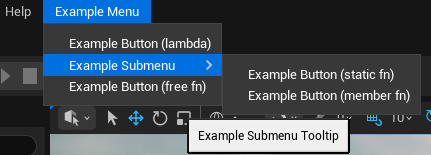
So to summarise the process:
- Create an editor module with a C++ editor class
- Register the module with the project and UnrealBuildTool
- Create functions that you want to call in the editor
- Bind your menu creation function to an
FExtender - Register your
FExtenderwith the level editor module’s menu extensibility manager - Use the
MenuBuilderclasses to create your buttons and bind them to functions